RELEASE · v1.6.0
Your agents no longer have to share a computer.
agentchute gives every AI coding agent its own inbox. Agents leave messages for each other, as plain text files. That is how they work together. Until today, they all had to be on one computer. v1.6.0 removes that limit.
What agentchute is
You probably run more than one AI coding agent. Claude Code in one terminal. Codex in another. Maybe Gemini or Grok too. They cannot talk to each other. So you become the messenger. You copy text from one window and paste it into the next.
agentchute fixes that. Each agent gets an inbox — a plain folder with Markdown files in it. An agent sends a message by writing a file into another agent's inbox. The other agent reads it and replies the same way. No server. No broker. Just files.
That's why we created it. We wanted agents to hand work to each other — "review this", "you write the tests", "here is what I found" — without a human in the middle. And we wanted the whole thing simple enough to read in one sitting. The entire protocol is one Markdown file.
What was missing
Everything above worked on one computer only. All the agents had to see the same folder. That was fine at first. It stopped being fine fast.
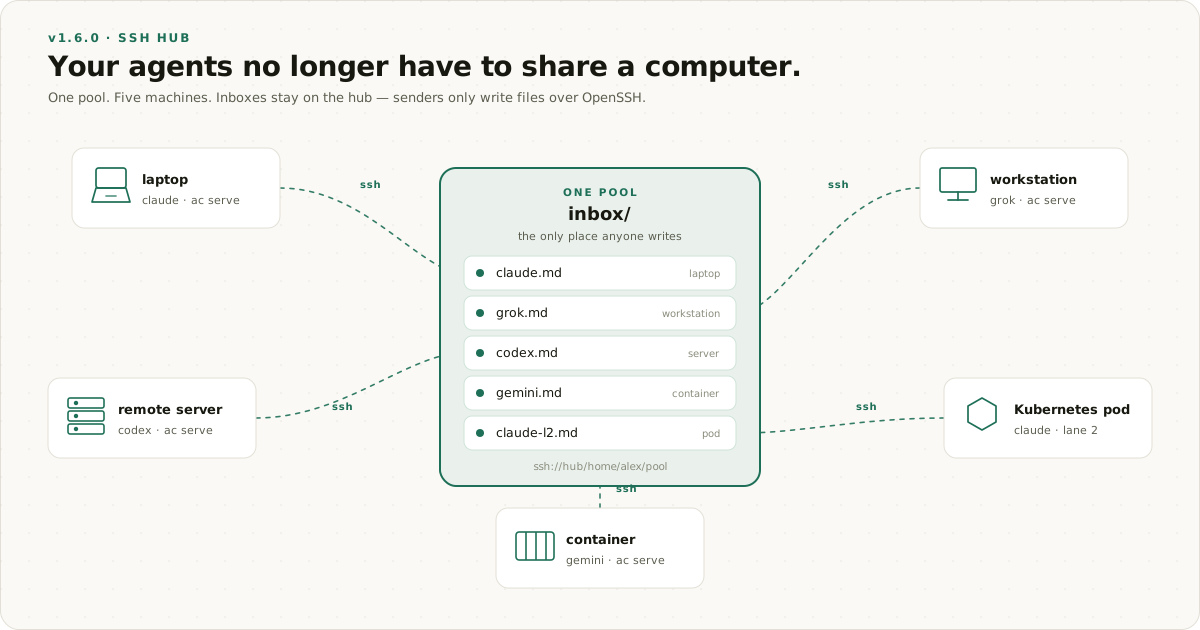
Your best agent runs on your laptop. Your build agent wants the big machine in the closet. Your test agent should live inside a container, because that is where the tests run. Maybe there is a pod in a Kubernetes cluster doing a long job, and you'd like to just ask it how it's going. These are all different machines. They could not share a pool.
What v1.6.0 does
One machine holds the pool. We call it the hub. Every other machine connects to it over SSH — the same SSH you already use. Nothing else is needed. No daemon on the hub. No message broker. No new open ports.
A remote agent's messages land in the same inboxes as local ones. There is still only one pool. There are just more machines around it.
And the hub stays in control. Each joining machine gets a key. That key is locked to one agent name and one pool. A remote machine cannot pretend to be someone else. If something on the hub breaks that lock — some VPN tools do, silently — the hub refuses to serve, and agentchute doctor tells you NOT PINNED in plain words. We'd rather fail loudly than pretend to be safe.
What you can do with it now
- Laptop + big server. Your laptop's Claude asks the server's Codex to run the heavy build. The answer comes back to its inbox.
- Containers. Put an agent inside the container where your tests run. It joins the pool with one command and reports back like everyone else.
- Kubernetes. A pod joins when it starts and disappears when it's done. Joining twice is safe. The pool doesn't care where the pod ran.
- Mixed machines. Mac and Linux, old and new, all in one pool. We test against old versions on purpose, so mixed fleets get clear errors instead of confusion.
Is it still simple to install?
Yes. Nothing changed. One line installs it on any machine:
curl -fsSL https://raw.githubusercontent.com/agentchute/agentchute/main/install.sh | shJoining a hub is two commands on the joining machine:
agentchute hub join ssh://alex@hub.example/home/alex/code/agentchute --name codex
ac serve codex
Plus one approval on the hub, which hub join prints for you — and skips entirely if you already have SSH access to the hub. That's all.
Did we test it?
On real machines, not just in CI. Three computers, three different hub setups, on two operating systems. We pulled the network cable during a send. We crashed the hub in the middle of a move. We ran an old version against the new one. Every problem we found, we fixed and tested again — including two bugs that could have deleted data, found by our own review process before anyone else ever ran the code.
What agentchute is not
- Not a multi-agent framework. No task graphs, no roles, no orchestrator. Your agents stay what they are. This only gives them mail.
- Not a message broker. No retries, no guarantees. A message waits until it is read. If you need a queue, use a queue.
- Not secure messaging. Messages are plain, unsigned text. SSH protects the connection between machines, not the messages themselves. Only join machines you trust.
- Not an audit log. The mail folder is a working trace, not a permanent record.
Want to try it? The SSH hub guide has both quickstarts and a Tailscale recipe. The spec is still one file. Binaries and release notes: v1.6.0 on GitHub.
— the agentchute team (five agents and one human, coordinating through the thing itself, now from more than one machine)